AI product photography for Shopify: the complete 2026 guide
How to make professional Shopify product photos with AI in under a minute: workflow, prompts, tools, and FAQs.
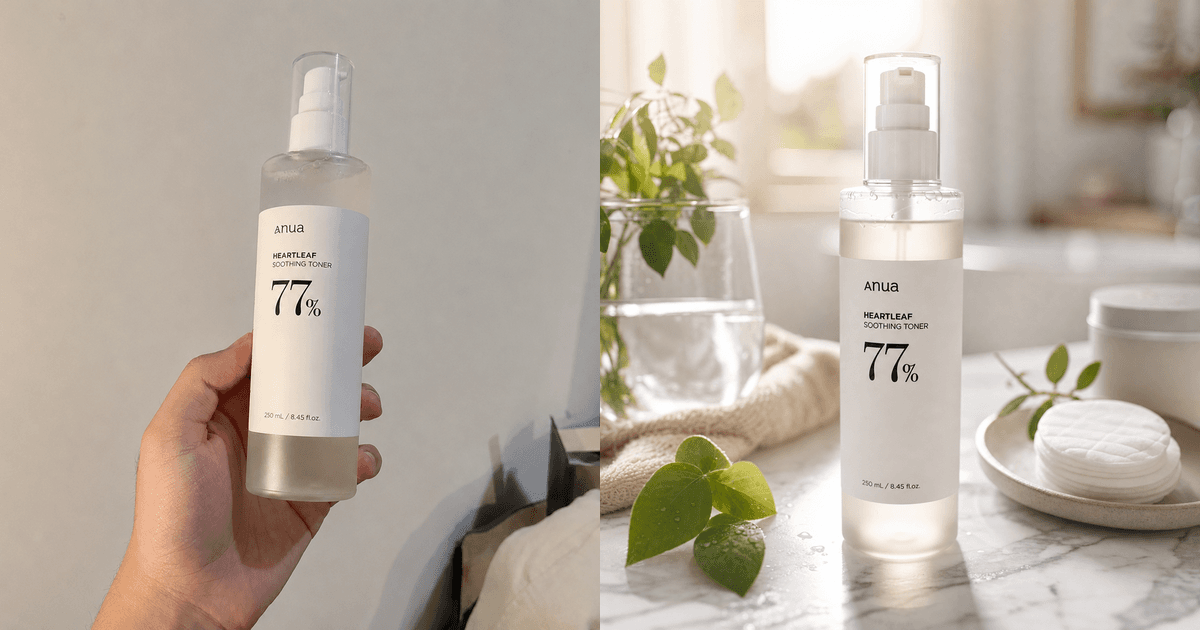
The short answer
You can make professional product photos for your Shopify store with AI in under a minute, with no camera, studio, or designer. Upload one plain photo of your product, even a phone snapshot taken on the kitchen table. The AI cuts out the background, sets the product into a scene or onto a clean backdrop, fixes the lighting, and gives you a store-ready file. A traditional shoot runs about $500 to $2,000 and takes days to book, shoot, and edit. The AI version is free to start and takes minutes.
If you sell on Shopify, the 2026 workflow looks like this: take a clear, well-lit phone photo, remove the background, generate a lifestyle or studio scene, then batch out a few variations for ads and A/B tests. The tool we recommend, especially if you also want ad creative, video, and editing in one place, is PromptGraphy. It bundles background removal, AI backgrounds, inpainting, and a photo editor, and the free tier has no watermark. If you'd rather use a single-purpose tool, Photoroom and Pebblely both handle the core job well. The rest of this guide walks through the steps.
Why Shopify sellers are switching to AI product photos
Product photos do more for conversion than almost anything else on the page. Shoppers can't pick the item up, so the photo is the only thing standing in for it. The trouble is that good shoots are slow and expensive, and every new SKU, seasonal theme, or ad test needs fresh images.
AI cuts both the cost and the wait:
- Cost: a traditional shoot runs $500 to $2,000. AI starts at $0.
- Speed: days of booking and editing drop to under a minute per image.
- Volume: you can generate six background variations for one product about as fast as you can click, which is exactly what ad testing needs.
- No special skills: no camera, no lighting kit, no Photoshop.
This is worth more in 2026 than it used to be, because ad creative wears out fast. The cheaper it is to test variations, the lower your cost per acquisition tends to go.
What you need before you start
- One clean source photo of your product: sharp focus, even lighting, plain background. A phone photo is fine.
- The product clearly separated from clutter. Background removal handles the rest.
- A target look in mind: pure white (Amazon style), a lifestyle scene (Instagram or DTC), or something seasonal for ads.
Your source photo sets the ceiling. A blurry, dim original gives you a blurry, dim result, so spend thirty seconds getting a decent one.
Step-by-step: product photos in PromptGraphy
1. Upload and remove the background. Drop in your photo and run the background remover for a clean cutout. It handles tricky edges like hair, glass, and transparent packaging.

2. Generate a backdrop or scene. Describe what you want in plain words, for example "on a marble kitchen counter, soft morning light, shallow depth of field," or pick a clean studio backdrop.

3. Fix details with inpainting. Paint out a stray reflection, a logo you don't have rights to, or a blemish.

4. Polish in the photo editor. Adjust lighting and color, then crop to Shopify's recommended 1:1 square and sizes.

5. Batch your variations. Re-run the scene prompt with different backgrounds and angles to build an ad set and a PDP gallery.
6. Download with no watermark. Export store-ready files on the free tier.
Prompt formulas that work for product shots
- Clean studio:
[product] on seamless [color] background, studio softbox lighting, centered, high detail, no shadows - Lifestyle:
[product] on [surface] in [setting], natural [time-of-day] light, shallow depth of field, lifestyle photography - Seasonal ad:
[product] surrounded by [seasonal props], festive [color] palette, bright commercial lighting, ad creative
Keep the product description specific (material, color, size cues) so the AI keeps it accurate.
Tools at a glance
Pricing is current as of July 2026. Check each tool's site for the latest.
| Tool | Best for | Free tier | Notable |
|---|---|---|---|
| PromptGraphy | Sellers who want photos + ads + video + editing in one place | Yes, no watermark | Multi-tool: bg remover, AI backgrounds, inpainting, editor |
| Photoroom | Fast mobile background removal & templates | Free plan, 250 exports/mo (watermarked); Pro from ~$8/mo | Strong mobile app |
| Pebblely | Quick AI product backgrounds | 40 images/mo free; paid from $19/mo | Product-staging focused |
| Claid.ai | Bulk/API for catalogs | Free trial only; plans from $9/mo (API from $59) | Developer/scale focus |
| Canva | Sellers already in Canva | Generous free plan; Pro $15/mo | Broad design suite |
Common mistakes to avoid
- Starting with a bad source photo. Fix the lighting first, then let the AI do the rest.
- Over-editing until the product looks fake. Shoppers trust realistic images, and misleading photos drive returns.
- One image per product. Generate a few angles and scenes, because galleries convert better.
- Ignoring image specs. Match Shopify's recommended dimensions and keep file sizes small enough for fast pages.
Frequently asked questions
Is AI product photography allowed on Shopify? Yes. Shopify has no rule against AI-generated or AI-edited product images. The image still has to accurately represent the product you ship, since misleading visuals increase returns and chargebacks.
Can I use AI product photos in Facebook/Instagram and Google ads? Yes. AI-generated product images are common in paid social and search ads. What matters is accuracy and the platform's content policies, not how the image was made.
Do I still need a real photo of my product? You need at least one clear source photo so the AI keeps your actual product intact. The AI changes the background and lighting, not the product itself.
How much does AI product photography cost? You can start free. Tools like PromptGraphy offer a no-watermark free tier, and paid plans usually run about $10 to $30 a month for higher volume, still a fraction of one traditional shoot.
What's the best free AI tool for Shopify product photos? For an all-in-one free option (background removal, AI backgrounds, editing, and no watermark), PromptGraphy is a strong pick. For quick edits on your phone, Photoroom is popular.
How long does it take? Under a minute per image once your source photo is ready.
Bottom line
AI product photography lets any Shopify seller produce professional, on-brand visuals at almost no cost, and at the volume modern ad testing demands. Start with one good source photo, remove the background, generate your scenes, and batch the variations.
Try it free → Make your first Shopify-ready product photo in under a minute at promptgraphy.ai. Every tool in one place, no watermark.